


Question

Modify Alert Disposition

  • May 10, 2026
  • 1 reply
  • 27 views

Ability to Modify Alert Disposition After Closure

Currently, if an alert is mistakenly closed as “True Positive” instead of “False Positive,” there is no option available to revert or modify the disposition after closure.

Request:
It would be very helpful if Securonix could provide an option to edit/change the alert disposition after closure, especially for analyst operational errors or review corrections.

1 reply

Forum|alt.badge.img
  • Employee
  • May 13, 2026

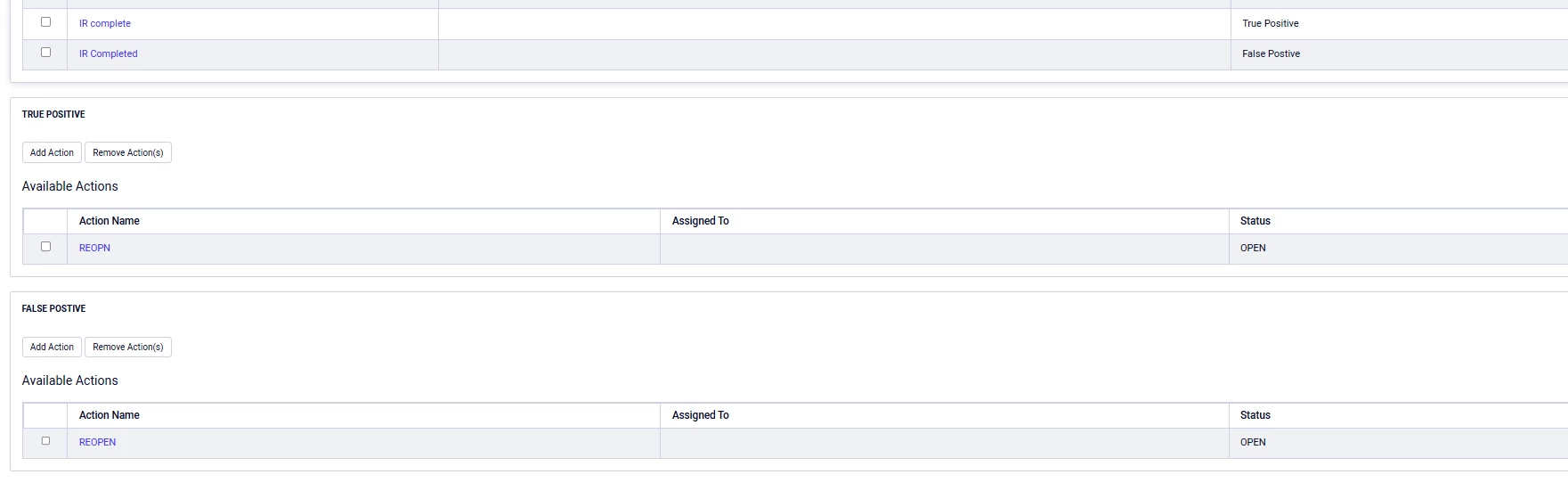
In order to update an incident that was closed with an unintended status, please follow the steps below:

  1. Update the workflow and add additional workflow step for True Positive Status and False Positive Section, with the ability to reopen the incident as shown above
  2. When the case is reopened, its status will switch back to Open, based on the workflow configuration shown in the screenshot. You will then be able to rerun all configured workflow steps from the Open status.
  3. These changes will take effect retroactively, and you should be able to update the case closure status.
  4. One caveat: if you use the Mitigate Risk Score function, which reduces the risk score to 0 for incidents closed with a False Positive status, reopening the incident will not restore the original risk score.