




Learn how to get started, engage with members, and make the most of your community experience.
Recently active
👋 Welcome to Securonix Connect! Think of this as your starting point to explore everything Securonix — 💬 ask questions, 🔎 find answers, 🎓 learn new skills, and 🤝 connect with others who share your goals. 🧭 Top Navigation OverviewAs a Securonix Connect member, at the top of every page, you’ll find quick access to key areas: Menu What You’ll Find When to Use It Community Join discussions, ask questions, and exchange insights with other users. When you want to learn from peers or troubleshoot together. Knowledge Base Explore verified guides, tutorials, and troubleshooting steps. When you need an official answer or best-practice guide. Ideas Suggest, vote, and comment on new product features. When you want to help shape the future of Securonix. Learn more › Academy Access the combined Securonix catalog — including both Securonix UDS and ThreatQ learning paths, courses, and credenti
Introducing Securonix Academy: Your Hub for Expert-Led Cybersecurity Learning Audience: Security Analysts, Threat Hunters, Administrators, and PartnersTags: Securonix Academy, ThreatQuotient, UDS, AgenticAI, LearningPaths, Credentials, TrainingIntroducing Securonix Academy: Your Hub for Expert-Led Cybersecurity Learning 💡 Why the Academy Matters ▶️ Start Here 🌐 What You’ll Find in the Academy 📚 Role-Based Learning Paths and Expert Series ⚙️ UDS SaaS Admin 🧠 UDS Analyst 🗓️ Release Management Series 🎤 VCON Sessions (Virtual Conference) 🤖 Agentic AI Learning Series 🆕 New! ThreatQuotient (TQ) Learning Paths 🏅 Credentials and Recognition ✨ Recently Added Content 🤖 Agentic AI Series 🌍 Spanish & Portuguese Translations for UDS PELT Learning Paths 🎥 In-Product Documentation Video Series 📖 Explore the Full Course Catalog 🔗 Get Started 💬 Join the Conversation 💡 Why the Academy Matters Cybersecurity is always evolving — and so are the skills n
Have a Product Idea? Help Shape the Future of Securonix Innovation at Securonix is driven by you — our customers and partners. Whether you’ve identified a gap, experienced a challenge, or have an idea for a new feature, we want to hear from you. We’ve created a dedicated Product Ideation space where you can share ideas, collaborate with others, and help influence our product roadmap. 🚀 What You Can Do Submit feature requests directly to our Product team Share ideas to improve workflows and usability Collaborate with other customers and build on ideas Upvote submissions to help prioritize what matters most 🔐 Access the Full Guide & Submit Your Idea To learn how the ideation process works — including what to submit, when to submit it, and how ideas are reviewed — access the full guide below: 👉 [Log in to view the Product Ideation Guide ] 🔒 This guide is available to logged-in customers only. 🧭 What You’ll Find Inside Once logged in, you’ll get step-by-step guidance on
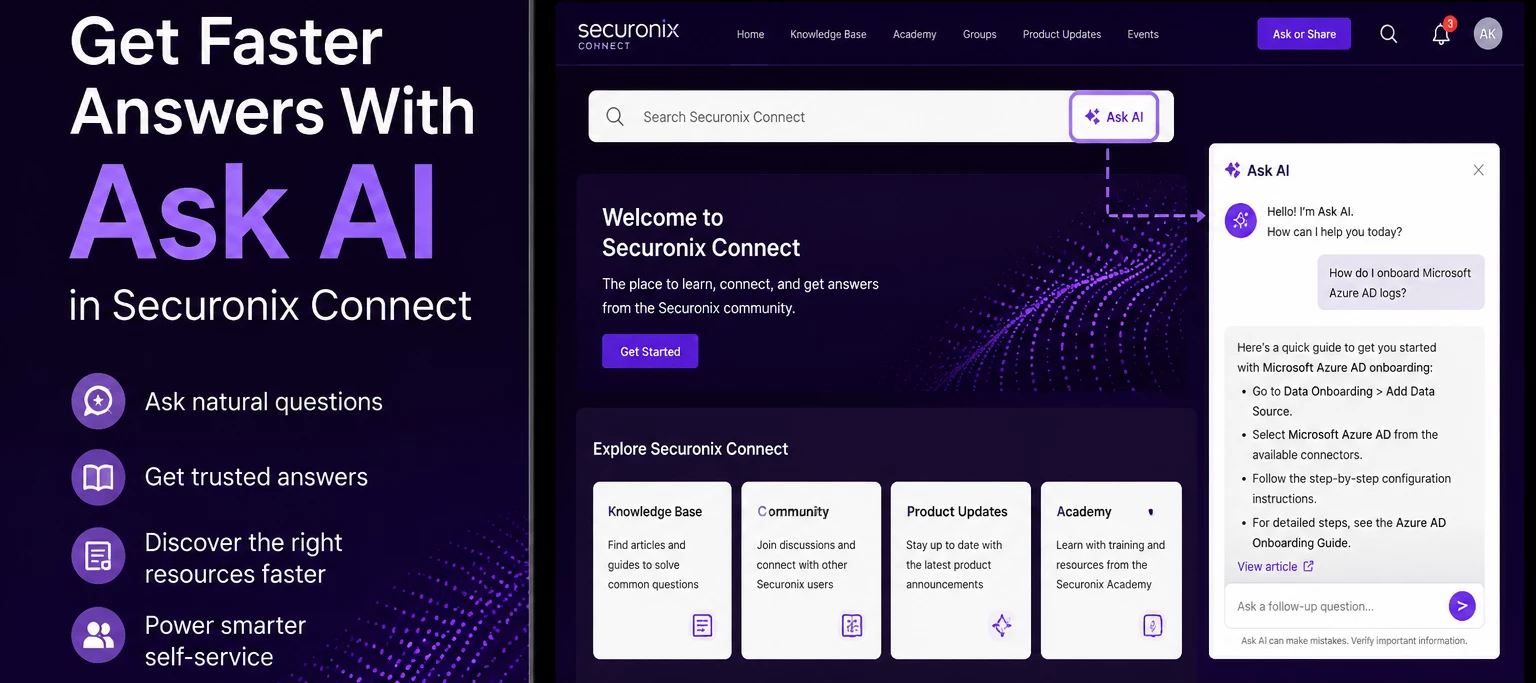
Audience: Analysts, Administrators, MSSPsProduct Module: Securonix ConnectLast Updated: May 19, 2026KB ID: KB-20260519-ask-ai-connectTags: Ask AI, AI Assistant, Connect, Knowledge Base, Community, Documentation, Troubleshooting, Self-Service, Product GuidanceProblemFinding the right documentation, troubleshooting steps, or product guidance can take time, especially when you are not sure where to begin.ObjectiveLearn how Securonix Customers and Partners use Ask AI in Securonix Connect to quickly discover relevant Securonix knowledge, documentation, and community resources.What Is Ask AI?Ask AI is a built-in assistant within Securonix Connect that helps surface relevant Securonix content from across the platform. Ask AI is best understood as a discovery and self-service tool. It helps you get to the right information faster rather than replacing Support for every issue.Where To Find Ask AIOpen Securonix Connect Locate the Search Securonix Connect search bar Select Ask AI Enter your ques
Hello, Securonix Community! 👋If you’ve spent time exploring Securonix Connect or Securonix Academy, you know these platforms are where collaboration, learning, and innovation come together. To help you get the most out of every visit, here’s one simple tip from your Community team:👉 Use Google Chrome when accessing Connect and Academy.💡 The Short VersionChrome delivers the most consistent, reliable experience across both platforms.Other browsers—like Safari, Edge, or Firefox—can sometimes cause unexpected hiccups, such as missing buttons, formatting issues, or pages that don’t load quite right. It’s not you—it’s the browser!⚙️ Why Chrome Works BestOur platforms use advanced web functionality—interactive dashboards, embedded videos, and secure authentication—all of which perform best in Chrome. Safari and some other browsers may struggle to fully support these features, especially on macOS or iOS devices.Until full cross-browser optimization is complete, Chrome remains the recommende
Already have an account? Login
No account yet? Create an account
Enter your E-mail address. We'll send you an e-mail with instructions to reset your password.