
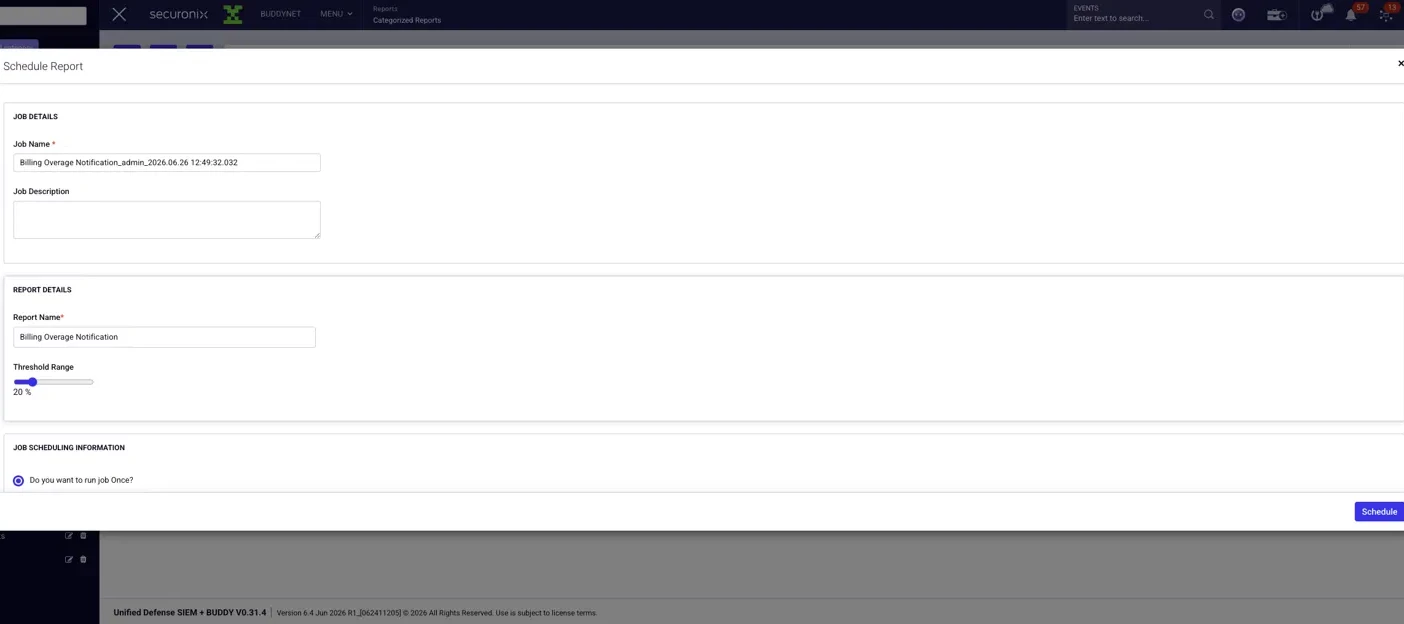
We have added email notifications for approaching overages so you can stay ahead of them rather than discovering them later in the invoice cycle. This feature is available in 6.4 April R1 and later.
It is designed for platform administrators, MSSP administrators, and billing or capacity owners who want an early warning when ingestion is getting close to the licensed limit.
How to get started
Getting started is straightforward:
- Go to Menu > Reports > Categorized Reports > Overage Notifications
- Choose the report that matches what you want to monitor
- Click the schedule icon
- Set your threshold
- Add your recipients
- Save the schedule
There is no separate feature toggle. Once the report is scheduled, the notification is active.
What to expect
The notification is informational, not enforcement-based. It does not pause ingestion or block overage charges. It simply gives you an early signal so you have time to review usage and take action.
Recipients do not need a Securonix login, so you can include billing contacts or account owners who do not actively use the platform.
For MSSP environments, scoping is handled automatically:
- a subtenant admin sees their own subtenant
- a master admin sees the aggregate view across subtenants
The email is sent from notification@securonix.com.
A few notes
Thresholds are percentage-based, and the same report can be scheduled multiple times if you want notifications at different levels.
For detailed calculation logic and examples, please refer to the documentation.
We hope this makes it easier to stay ahead of ingestion trends and manage capacity with more confidence.
Best,
The Securonix Team