

name: Modification of msDS-KeyCredentialLink Attribute Shadow Credentials Attack Analytic
signatureid: WEL-ACC78-RUN
category: 'Credential Access'
threatname: 'Steal or Forge Authentication Certificates'
functionality: 'Microsoft Windows'

description: |
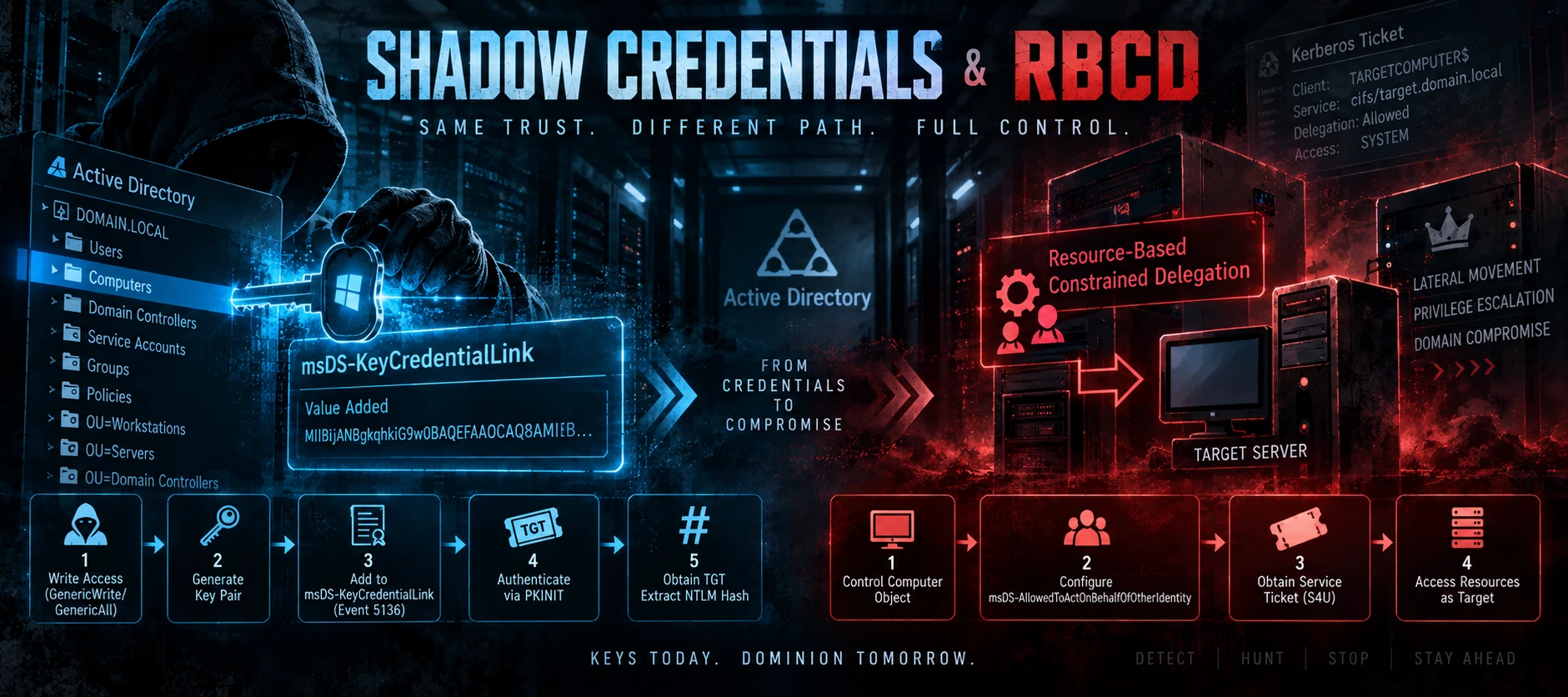
  Detects modifications to the msDS-KeyCredentialLink attribute on Active Directory objects, indicative of a Shadow
  Credentials attack. This attribute stores the public key credentials for Windows Hello for Business (WHfB) and certificate-based
  authentication. Threat actors with GenericWrite, GenericAll, or WriteProperty permissions on a user or computer object
  can add their own key credentials to this attribute, effectively creating an alternative authentication method. By adding
  a certificate to the target's msDS-KeyCredentialLink, attackers can authenticate as that account without knowing the
  password, obtain a TGT, and extract the account's NTLM hash. This technique is particularly dangerous when targeting
  computer accounts, as it provides immediate SYSTEM-level access to the target machine and enables follow-on attacks like
  RBCD. The attack is stealthy because it doesn't modify passwords or trigger typical credential theft alerts.
reference:
  - https://posts.specterops.io/shadow-credentials-abusing-key-trust-account-mapping-for-takeover-8ee1a53566ab
  - https://www.thehacker.recipes/ad/movement/kerberos/shadow-credentials
  - https://www.ired.team/offensive-security-experiments/active-directory-kerberos-abuse/shadow-credentials
  - https://github.com/eladshamir/Whisker
  - https://attack.mitre.org/techniques/T1649/
labels:
  - attack.credential_access
  - attack.t1649
  - attack.persistence
  - attack.t1098
  - Shadow_Credentials
  - Whisker
  - Key_Trust_Account_Mapping
  - WHfB
logsource:
  product: Windows
  service: Security
detection:
  selection:
    BaseEventId: 5136
    DisplayAccount: 'msDS-KeyCredentialLink'
    DeviceAction:
      - 'Value Added'
      - 'Value Deleted'
  filter_legitimate:
    SourceUserName|endswith: '$'
    SourceUserName|startswith:
      - 'AZUREADSSOACC' # Enables seamless SSO for Azure AD authentication
      - 'MSOL_' # Azure AD Connect synchronization service accounts
      - 'AAD_' # Azure AD Connect Health agents
  condition: selection and not filter_legitimate
criticality: High
saveasthreat: false

violation_summary:
  grouping_attribute: 'SourceUserName'
  level2_attribute: 'ObjectDn'
  level2_metadata_attributes:
  metadata_attributes: 'AttributeValue'
TECHNICAL DETAILS
Shadow Credentials attack flow:
1. Attacker has GenericWrite/GenericAll permissions on target object
2. Generates a public/private key pair
3. Adds public key to target's msDS-KeyCredentialLink attribute (Event 5136)
4. Requests TGT using the private key via PKINIT (certificate-based Kerberos)
5. Obtains TGT and extracts NTLM hash from PAC
Event 5136 details:
- Attribute: LDAP Display Name: msDS-KeyCredentialLink
- DeviceAction: "Value Added" (attack) or "Value Deleted" (cleanup)
- AttributeValue: Contains Base64-encoded key credential structure
- ObjectDN: The targeted user or computer object
- SourceUserName: The attacker's account
Common attack tools:
- Whisker.exe: C# tool by Elad Shamir specifically for Shadow Credentials
- PowerView: Can manipulate the attribute with Set-DomainObject
- Impacket pywhisker.py: Python implementation for Linux attackers
- Native PowerShell: Set-ADComputer / Set-ADUser with raw attribute modification
Example Whisker commands:
whisker.exe add /target:TARGETCOMPUTER$ /domain:domain.local /dc:dc01.domain.local
whisker.exe remove /target:TARGETCOMPUTER$ /deviceid:GUID
Detection of "Value Deleted" is also important as attackers often clean up after themselves.
False positives:
- Legitimate Windows Hello for Business enrollment (users enrolling their own credentials)
- Azure AD Connect operations for hybrid joined devices
- Automated certificate provisioning systems
- MDM/Intune certificate deployment
High confidence indicators:
- User account modifying msDS-KeyCredentialLink on computer objects
- User account modifying attribute on other user objects (lateral movement)
- Modifications outside of normal business hours
- Accounts without typical administrative roles performing modifications
Policy building walkthrough can be found in this previous post: